Showing posts with label Canon 60d. Show all posts

Which camera kits should I buy for my first DSLR?

How much money do you want to use?


First question I would like to ask you is "How much money do you want to use?"
It will define which gears you can go and what is the most suitable kits for you.
It can be under 500 or under 1000 US dollars, which will limit your choice to the entry or mid-level models in each manufacturer's range. You can also hunt around for some bargains whenever a new model is announced.

Secondly, try to find the latest or second latest camera within your budget. A second hand camera is not a bad choice. But remember to ask for the shutter-count and investigate carefully.
FAQ: Astro Photography Tool


photosaddict, shutter count, canon
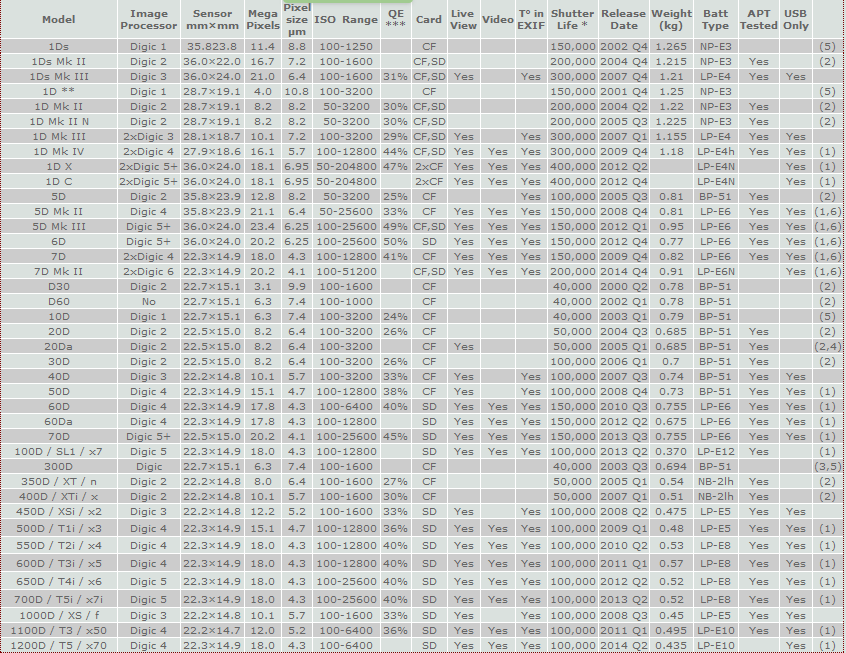
Canon EOS DSLR camera models matrix

It is very nice to get your feedback after reading my blog post on finding the shutter count on Canon cameras with a PC (Windows computer) using software APT.
I will try to summary some common questions that I received in the last 6 months. Hopefully it will help you solve out some of the problem when using APT.
Question 1: I found APT a commercial software. Do I need to purchase it to find out my Canon 60D shutter count?
Answer: No. You can use free version of APT to get the shutter count.


Question 2: Does APT support Canon 7D mark II?
Answer: Not yet. But as you know, APT is updated frequently. The new cameara should be supported soon.

Question 3: I had a Canon 30D, installed APT on my Windows 7 64 bits. When I plug it in, APT said it does not support my camera series.
Answer: Unfortunately, the DIGIC 2 cameras (20D, 20Da, 30D, 350D, 400D) is not fully supported by ATP under Windows 7 64 bits.
You can try to install APT on 32bits Windows 7 computer or configure a virtual 32bits machine on your 64bits Windows 7 machine to use APT with your DIGIC 2 camears.
All DIGIC 3 and 4 cameras are fully supported.

Check Canon shutter count on Windows

As you know, I have written an introduction how to check your Canon DSLR's shutter count with a MacOS application. Many questions sent to me asking about an equivalent application on Windows.
I decide to write another post about shutter count checking but with a FREE Windows application.
This application's name is Astro Photography Tool - APT. This program is different to all other MacOS apps which is only FREE for a short time or some function excluding the shutter count check. APT is FREE for basic functions including the shutter count identification which is awesome.

shutter count, canon eos, APT, photosaddict
Main screen of Astro Photography Tool
APT - Astro Photography Tool is an application that allows controlling Canon EOS and ASCOM compatible CCD cameras and is completely designed with astro imaging in mind. The focus of this tool is to automate the control of your camera, to help in almost all stages of your imaging session, to preserve the dark adaptation of your eyes and to bring all this packed in flexible and easy to use form.


If you have any queries, please find out the FAQ section first. If you can not find the answer there, please leave a comment, I will get back to you as soon as possible.


Some of you will wonder is it a right application for shutter count checking?
Yes, it is. Even it is a rather big application which can help you play around with your Canon EOS cameras. Most functions are useful if you are astro photographer, and some of advanced functions need to purchase full version. But if you only want to know your Canon DSLR's shutter count, FREE version of APT is more than enough.

How to get the shutter count information?

How to Check Your Canon DSLR Shutter Count (MacOS)

If you are buying your first DSLR and want to know which camera kit is suitable for you, please consider my recommendation. And if your budget is limit and you want to purchase a second hand DSLR camera or simply want to check your current camera's shutter count. This post is for you.

It's really big question to answer when I decided to buy a second hand Canon 60D and it turns out that it is very difficult to get the information about the shutter count from Canon DSLR series.


To understand how important the shutter count is. Please read this post

After getting the shutter count out. You also want to know "How many shutter count is considered too many?". Answer is found here

The application introduced in this post is for MacOS. IF you are Windows user, please find the answer here

Shutter count tells camera "true age"


What is the first question you should ask buyer when buying a second hand camera?

Canon camera shutter count checking (Why and How)

If you are buying your first DSLR and want to know which camera kit is suitable for you, please consider my recommendation. And if your budget is limit and you want to purchase a second hand DSLR camera or simply want to check your current camera's shutter count. This post is for you.

It's really big question to answer when I decided to buy a second hand Canon 60D and it turns out that it is very difficult to get the information about the shutter count from Canon DSLR series.

To understand how important the shutter count is. Please read this post

After getting the shutter count out. You also want to know "How many shutter count is considered too many?". Answer is found here

The application introduced in this post is for MacOS. IF you are Windows user, please find the answer here

My sunrise weekend

I am a hobbyist photographer and usually go out with my camera on weekends. Last weekend, as usual, I was ready for my sunrise shoot in Mentone beach. Every thing was ready for the wonderful morning, the weather was forecast to be partly cloudy which is my favorite. I love to shoot sunrise landscape with clouds patterns in orange and colorful sky. Tripod ready, filters ready, and certainly my best friends, canon 60D and Tamron 17-50mm f2.8. I am absolutely ready to go.
pic name pic name pic name
Canon 60D Tripd Tamron 17=-50mm f2.8
My best friends
Got up at 6.30am, leave home around 6.45am and got to the beach at 7.15am. I have about 15 minutes before the sun comes up. The sky turns to wonderful colors, many sea gulls and pelicans there. I took the first photo of the sky. DO NOT forget to check the settings which is: aperture priority - f9, ISO 100. That's great.