Showing posts with label Shutter count. Show all posts

Which camera kits should I buy for my first DSLR?

How much money do you want to use?


First question I would like to ask you is "How much money do you want to use?"
It will define which gears you can go and what is the most suitable kits for you.
It can be under 500 or under 1000 US dollars, which will limit your choice to the entry or mid-level models in each manufacturer's range. You can also hunt around for some bargains whenever a new model is announced.

Secondly, try to find the latest or second latest camera within your budget. A second hand camera is not a bad choice. But remember to ask for the shutter-count and investigate carefully.
FAQ: Astro Photography Tool


photosaddict, shutter count, canon
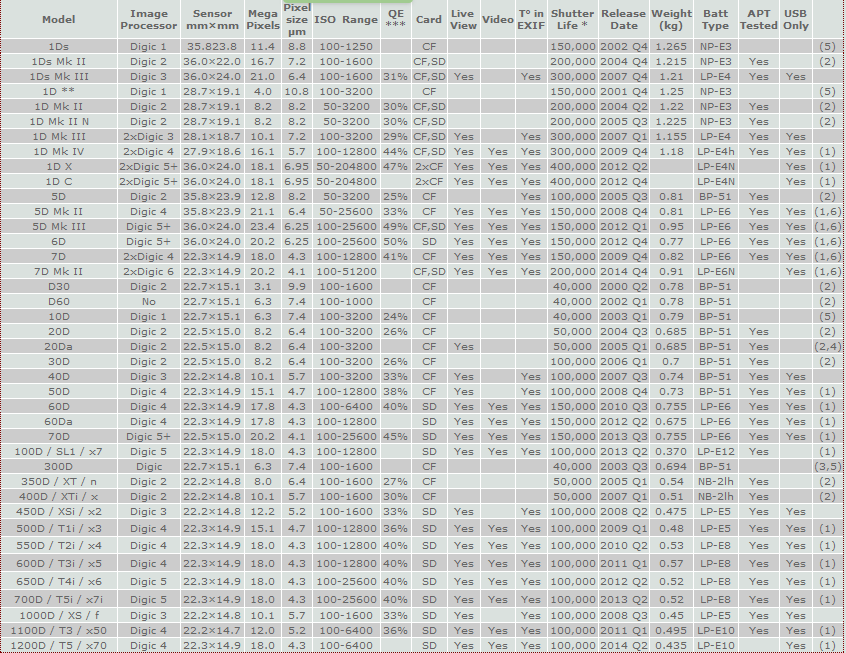
Canon EOS DSLR camera models matrix

It is very nice to get your feedback after reading my blog post on finding the shutter count on Canon cameras with a PC (Windows computer) using software APT.
I will try to summary some common questions that I received in the last 6 months. Hopefully it will help you solve out some of the problem when using APT.
Question 1: I found APT a commercial software. Do I need to purchase it to find out my Canon 60D shutter count?
Answer: No. You can use free version of APT to get the shutter count.


Question 2: Does APT support Canon 7D mark II?
Answer: Not yet. But as you know, APT is updated frequently. The new cameara should be supported soon.

Question 3: I had a Canon 30D, installed APT on my Windows 7 64 bits. When I plug it in, APT said it does not support my camera series.
Answer: Unfortunately, the DIGIC 2 cameras (20D, 20Da, 30D, 350D, 400D) is not fully supported by ATP under Windows 7 64 bits.
You can try to install APT on 32bits Windows 7 computer or configure a virtual 32bits machine on your 64bits Windows 7 machine to use APT with your DIGIC 2 camears.
All DIGIC 3 and 4 cameras are fully supported.

Check Canon shutter count on Windows

As you know, I have written an introduction how to check your Canon DSLR's shutter count with a MacOS application. Many questions sent to me asking about an equivalent application on Windows.
I decide to write another post about shutter count checking but with a FREE Windows application.
This application's name is Astro Photography Tool - APT. This program is different to all other MacOS apps which is only FREE for a short time or some function excluding the shutter count check. APT is FREE for basic functions including the shutter count identification which is awesome.

shutter count, canon eos, APT, photosaddict
Main screen of Astro Photography Tool
APT - Astro Photography Tool is an application that allows controlling Canon EOS and ASCOM compatible CCD cameras and is completely designed with astro imaging in mind. The focus of this tool is to automate the control of your camera, to help in almost all stages of your imaging session, to preserve the dark adaptation of your eyes and to bring all this packed in flexible and easy to use form.


If you have any queries, please find out the FAQ section first. If you can not find the answer there, please leave a comment, I will get back to you as soon as possible.


Some of you will wonder is it a right application for shutter count checking?
Yes, it is. Even it is a rather big application which can help you play around with your Canon EOS cameras. Most functions are useful if you are astro photographer, and some of advanced functions need to purchase full version. But if you only want to know your Canon DSLR's shutter count, FREE version of APT is more than enough.

How to get the shutter count information?

Shutter count tells camera "true age"


What is the first question you should ask buyer when buying a second hand camera?

Canon camera shutter count checking (Why and How)

If you are buying your first DSLR and want to know which camera kit is suitable for you, please consider my recommendation. And if your budget is limit and you want to purchase a second hand DSLR camera or simply want to check your current camera's shutter count. This post is for you.

It's really big question to answer when I decided to buy a second hand Canon 60D and it turns out that it is very difficult to get the information about the shutter count from Canon DSLR series.

To understand how important the shutter count is. Please read this post

After getting the shutter count out. You also want to know "How many shutter count is considered too many?". Answer is found here

The application introduced in this post is for MacOS. IF you are Windows user, please find the answer here

EOSCount to check your shutter count

Six months ago, I posted a title on checking the Canon DSLR camera's shutter count and I have got many feedbacks from all of you. The most recent feedbacks from MacOS user are about the EOS Inspector apps is not FREE anymore. Yes, it is not FREE anymore and I understand that it is quite annoying if you read my post recently and that is why I decide to post another title on this topic by updating information and apps. To find out why it is important, especially when you buy a second hand camera, you can read my recent post.


As mentioned in the first post, if you are MacOS user, EOS inspector is a good choice, especially in the last few months. But now it costs you $2.49 to purchase it. Certainly, if you love EOS Inspector, you can go with it, it is not so expensive and in my opinion, it worths your money.
If you are willing to pay, there is another apps named EOSCount for both MacOS and Windows. Let's have a look on its UI.
photosaddict, shutter count, canon camera, checking, phda, EOScount

Canon EOS 7D Mark II First Impressions


This is a personal thought on 7D mark II from Laszlo Pusztai
When I first picked up the 7D Mark II at this year's Photokina show, it struck me how similar it feels to the 5D Mark III. I thought that if image quality is there, I would definitely buy one. Due to this similarity with the 5D Mark III, I instantly knew that ergonomics and handling will be great. The only haunting question was image quality, but lacking any useful reviews, I had to place my order without knowing anything about it. My primary goal was to certify the camera for my ShutterCount app - and actually using it for photographing birds came as second. Purchasing blindly wasn't that big risk, because if it somehow turns out to be something I don't like, I would be able to easily sell it given the high demand.
And as you may guess, I really like the 7D Mark II. But being a perfectionist, I don't think everything is as glorious as marketing materials may suggest. Some of my observations may look strange, or don't even important to you and your style of photography, but this is what I think of the camera.
Handling
As I mentioned, handling is virtually identical to the 5D Mark III. I can switch between them effortlessly. The 7D is a tad smaller, and is on the edge of being comfortable in my large hands. Buttons and dials are almost the same on the two cameras, with two notable differences.

How long will the shutter last?

After identifying your shutter count. The next question should be: is it too many or is it worth to buy a second hand camera with 40 000 shutter count?


I will help you to answer such questions with easy step. Please look at the following diagram.

This diagram shows the average survival percentage of a DSLR camera based on the shutter count.

How can you read these information?