Showing posts with label FAQ. Show all posts

14 YouTube Channels for The Best Photography Tutorials

Learning photography takes time, and it’s all the more enjoyable if you can pick it up at your own pace. It’s in situations like these that YouTube comes in handy.

There’s plenty of channels out there that are dedicated to this topic, and many that cater for those who are new to the craft by breaking down the many aspects of photography into small, easy-to-digest video segments.

Here’s a list of YouTube channels that will help inspire as well as improve your photography skills (in no particular order):

COOPH
(Subscribers: 315,000+ | Views: 28,084,000+)

COOPH or The Cooperative Of Photography has only a handful of videos on their channel so far, but they’re worth watching because there’s lots of practical photography tips and tricks that you can put to use right away. Videos of interest include 7 DIY Photography Tips Using Household Objects.
FAQ: Astro Photography Tool


photosaddict, shutter count, canon
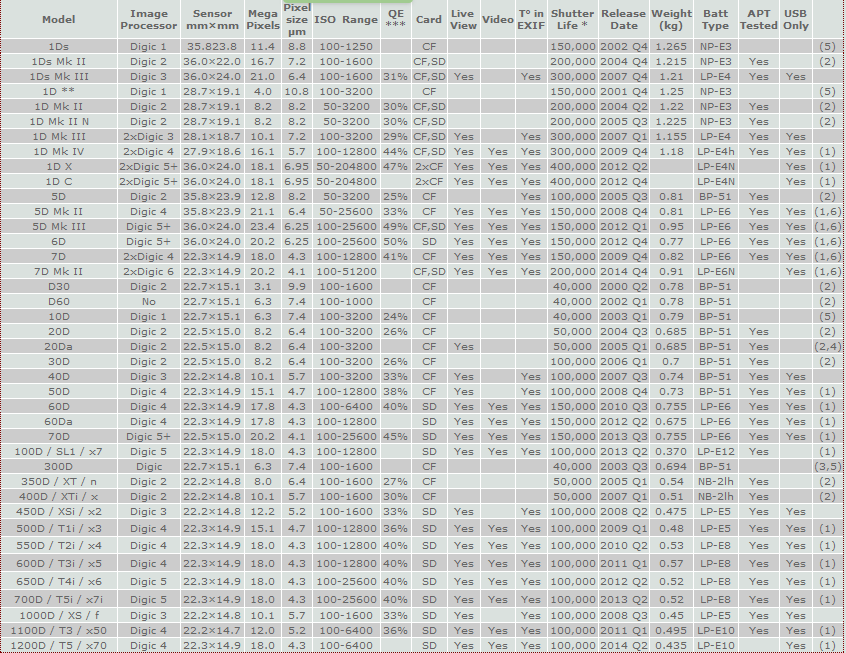
Canon EOS DSLR camera models matrix

It is very nice to get your feedback after reading my blog post on finding the shutter count on Canon cameras with a PC (Windows computer) using software APT.
I will try to summary some common questions that I received in the last 6 months. Hopefully it will help you solve out some of the problem when using APT.
Question 1: I found APT a commercial software. Do I need to purchase it to find out my Canon 60D shutter count?
Answer: No. You can use free version of APT to get the shutter count.


Question 2: Does APT support Canon 7D mark II?
Answer: Not yet. But as you know, APT is updated frequently. The new cameara should be supported soon.

Question 3: I had a Canon 30D, installed APT on my Windows 7 64 bits. When I plug it in, APT said it does not support my camera series.
Answer: Unfortunately, the DIGIC 2 cameras (20D, 20Da, 30D, 350D, 400D) is not fully supported by ATP under Windows 7 64 bits.
You can try to install APT on 32bits Windows 7 computer or configure a virtual 32bits machine on your 64bits Windows 7 machine to use APT with your DIGIC 2 camears.
All DIGIC 3 and 4 cameras are fully supported.